The Amanda's Letter add-on for The Pig has been Kill Switched due to an issue with incorrect RBT count.
http://dbd.game/killswitch
Mouse Sensitivity is Slow (Bug)

I have that issue for 2 days, before it was good.
It starting random times. I dont know why. And nothing solve this problem.
Before ask, yes my mouse sensitivity is % 100 in game. And no, my mouse is just normal. I tried on so many games, they all were good. Only DbD has that problem for couple days.
And this problem makes loops imposible and i am dying for that. So annoying.
Comments
-
Can anyone help please? Game is really unplayable with that.
0 -
Does your mouse have any buttons that increase / decrease DPI? Do you have any software that effects / controls your DPI / sensitivity ?
Do you know how to access the GameUserSettings & Input file? Have u done any modifications to it & set it to read only?
Other than that...
Maybe your current mouse is conflicting with the DBD settings. Perhaps try a new mouse for starters, unplug it, plug it again.
-------
I also found this:

You will not get banned for editing the Input & GameUserSettings File
Otherwise I would've gotten banned 2 years ago.
-------------
If you found the Input file, same folder as GameUesrSettings
scroll down at the bottom and it should look like this.
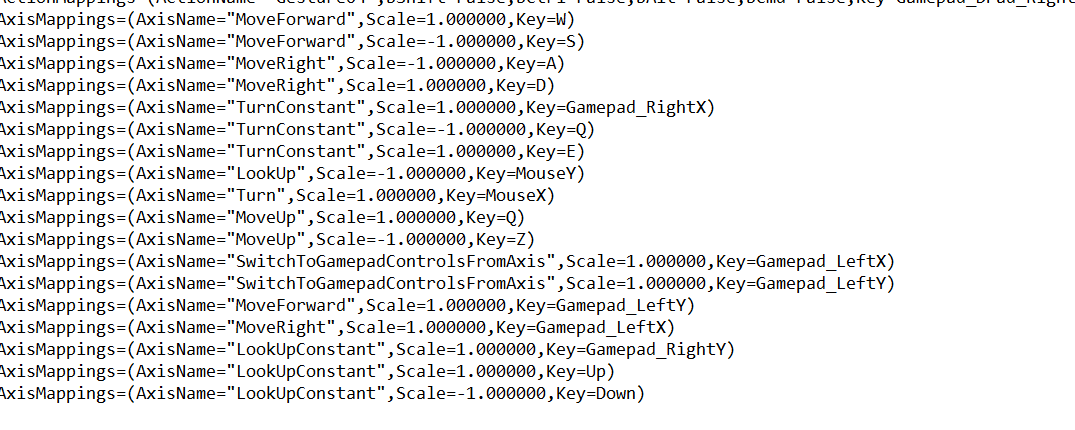
What you should look for is the 1.00000 number in all categories.
------
If none of these work, create a thread in the technical problems section on the forum
https://forum.deadbydaylight.com/en/categories/technical-issues here
0 -
I am using HP mouse and yes it has buttons. It is already full sensitive. I said that problem happening only on DbD. I tried so much games. When i get that bug i am restarting DbD, that fixes game for 1 2 matches and then bug comes back. Really annoying me and i think that is just bug.
0 -
Then your mouse is conflicting with the DBD settings. How old is it? For how long have u played with it DBD? I know for a fact that some mices have this problem with DBD.
Other than, I think you might have some input lag problems. If you said that after some restarts it works then it goes back.
This might sound idiotic, but are sure you clicked confirm in the setings? Also, when your mouse does this, can you also go settings and check your sensitivity real quick?
Best advice I can give you is let someone who's more experienced than me at treating these kind of issues. You need to make a thread in the technical problems section. I gave you the link above, at the bottom of my previous comment. @KhaineGB might help you fix this problem
0 -
Thank you trying help me.
I bought it 1 month ago. And i played +100 hours DbD with that. And i never had this problem. 2 days ago that problem started. I read forum and i searched help. But nothing worked.
Only that solves: When my mouse going to slow, i am restarting DbD and it solves for 1 2 matches and then starting again. And that is not happening only to me. Some people have same issue. And i dont think that is lag problem because i am also playing different online games. And only DbD gives me that issue... I hope i can fix this because game is really unplayable right now for me
0 -
When I meant lag, I meant a specific lag input problem that revolves around DBD.
One thing you could do for me and see how it goes is try to find this in the display settings. I use Win 10. Right click on Screen -> Display Settings
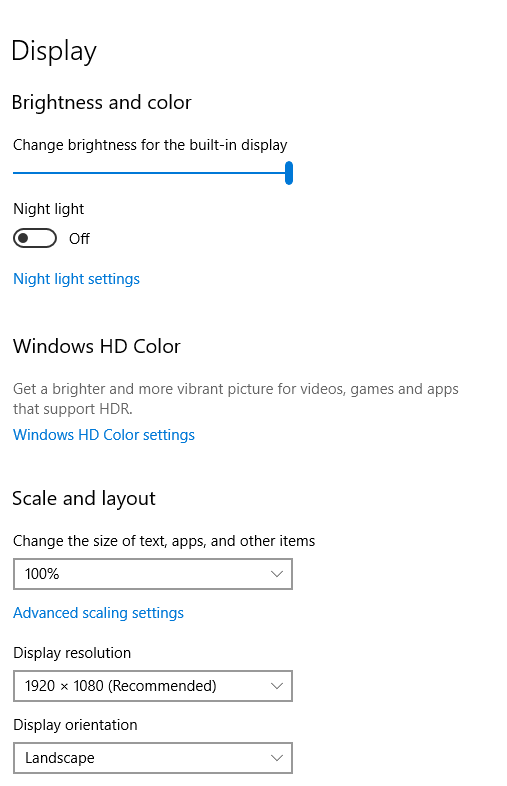
Scale & Layout to 100%
If it's set to 100% by default try 125% at least and tell me how it goes.
This used to be a problem with input lag regarding DBD. This was the best way to fix it. I don't know if it would work for you. I've had input lag myself until I've set scale and layout to 100%.
Knowing BHVR, this input lag problem still persists to this day.
Other than that, try the technical issues section on the forum.
0 -
I've seen a few people with this right now, there's a bug report in on it as it only started happening very recently. Please upvote the bug report and add any extra information there.
1


