http://dbd.game/killswitch
help me

i have dbd for 3 years
and i have this problem
Fatal error: [File:Unknown] [Line: 1209] GameThread timed out waiting for RenderThread after 180.00 secs
DeadByDaylight_Win64_Shipping {0x0000000000000000} + 123902970 bytes
DeadByDaylight_Win64_Shipping {0x0000000000000000} + 67818487 bytes
DeadByDaylight_Win64_Shipping {0x0000000000000000} + 67845580 bytes
DeadByDaylight_Win64_Shipping {0x0000000000000000} + 67845706 bytes
DeadByDaylight_Win64_Shipping {0x0000000000000000} + 67850772 bytes
DeadByDaylight_Win64_Shipping {0x0000000000000000} + 67890180 bytes
DeadByDaylight_Win64_Shipping {0x0000000000000000} + 153220942 bytes
kernel32 {0x0000000000000000} + 75133 bytes
ntdll {0x0000000000000000} + 371288 bytes
HELP ME PLS
Comments
-
Are your drivers up to date? I'm not an expert on this sort of thing, but have heard that somw fatal errors like this are due to this type of error. See if this helps out.
0 -
You had the same problem two times already:
https://forums.bhvr.com/dead-by-daylight/discussion/373088/dbd-crashing-help-me#latest
Considering that you had another Thread, you probably fixed it before? Did you try the same fix again? If yes, what was it?
In general, try to update your Drivers and do a fresh install of DBD.
0 -
driver updated
what waht i do
0 -
ehm i can explain
but i update driver
i run as administrator
i low the graphics everyeore
i update all
but nothing why?
0 -
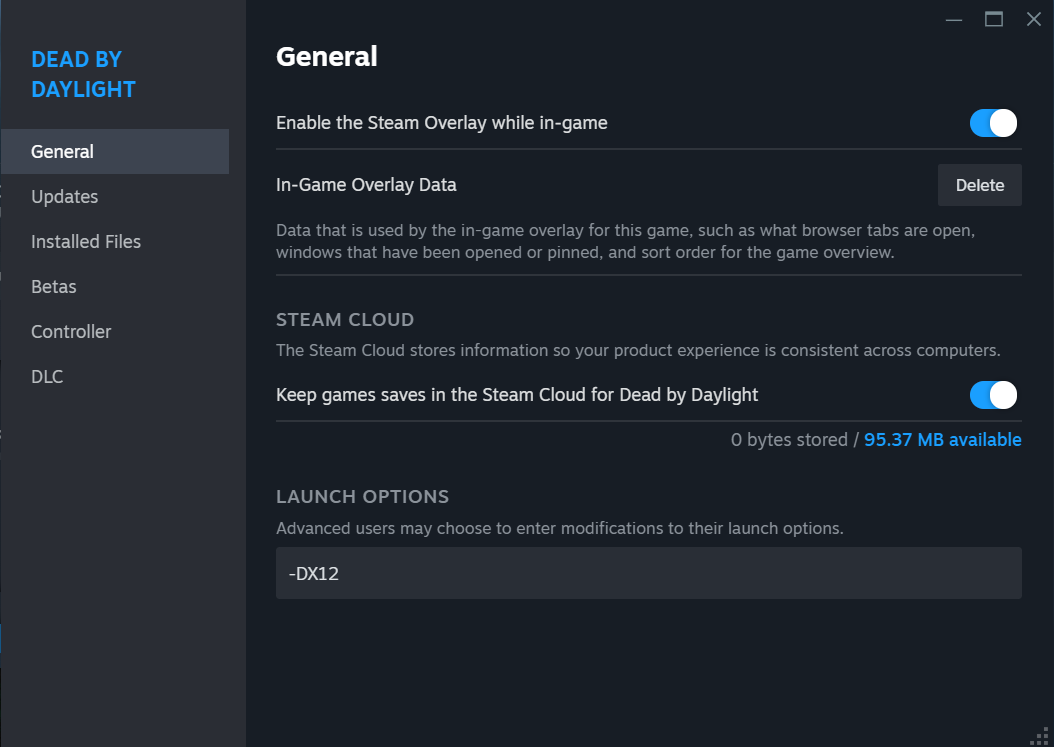
Are you by chance using an Intel Arc GPU? I received this error a few times after crashing recently when I switched out my GPU for an Intel Arc A770 16GB GPU. I found reverting back to driver 31.0.101.5085 stopped the crashing. I also started launching the game in DirectX 12 because I read that can help performance and other issues especially with AMD and more current gen hardware. If you go into Steam and right click on Dead By Daylight in your library then select properties you should see an option under the General tab called "Launch Options." If you put in -DX12 in that box it'll launch the game with DirectX12 enabled. You could try that and see if it helps. This helped me so I figured I'd pass it along.
Which GPU are you using?
 0
0 -
When I google your Error-message it seems like others (not only in DBD) have the same problem as well and it seems to be driver-related.
What is your GPU? Which driver are you using?
0 -
INTEL
0 -
IT WORKED THX
0 -
Well there you go. Glad it worked for you!
0