Once you have signed in, on the right hand side you can use the "report bug" button to be able to fully report the bug you've encountered. Thank you.
http://dbd.game/killswitch
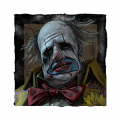
Error in Clown's cosmetic, Mime Artist Suit (Droll)
#JusticeforClown
Note: This isn't a bug, it's an error in the cosmetic design that I need to point out. I wasn't the first to find this, however nothing has been done about it so uh, yeah. I apologize if this is the wrong place to put this in.
Step 1 : Boot the game
Step 2 : Select play as killer or store
Step 3 : Select the Clown
Step 4 : Use his body cosmetic, Mime Artist Suit (Droll)
Step 5 : Notice his bowtie in the cosmetic icon in the store/customization, his bowtie is blue in the image, and purple in-game.
Here's what it looks like in the customization icon (look at the bowtie):

And here's what it looks like in-game:

Comments
-
In addition, we can say that his butterfly is ALWAYS pink, regardless of the chosen outfit.
2 -
Still not fixed.
0 -
It's fixed! Here's what it looks like now:

Thank you BHVR!
1

