Once you have signed in, on the right hand side you can use the "report bug" button to be able to fully report the bug you've encountered. Thank you.
http://dbd.game/killswitch
"No Cosmetics Available" Except For Uncommon Items?

SUMMARY OF THE ISSUE:
It appeared on a random day, but for every character I have, no matter of which survivor or killer, only my uncommon cosmetics show up when I'm trying to change an outfit in my customisation menu. The weirdest thing? I can go to the store for the same character I'm trying to customise, but all their outfits will be there in the store for me, including ones I already own. I can only change outfits in the store.
PLATFORM:
Steam
STEP BY STEP INSTRUCTIONS ON HOW THE ISSUE OCCURED:
No step-by-step, it just happened when I logged on one day.
VIDEO:
https://streamable.com/k1wlci
PLAYER LOGS:
Nothing to note, it happened a month ago at first and hasn't fixed, despite verifying my game files, changing install folders, everything.
Comments
-
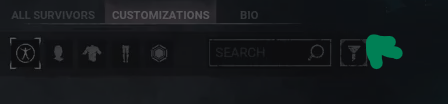
Can you check to see if you have a filter on in here?
0 -
I had the same issue because of the filters. Make sure you have unticked every option in the filter tab and you should see the skins.
0 -
I had a similar issue, it turned out I had accidentally turned on a filter setting.
0
