Once you have signed in, on the right hand side you can use the "report bug" button to be able to fully report the bug you've encountered. Thank you.
https://forums.bhvr.com/dead-by-daylight/discussion/472588/future-of-dead-by-daylight-forums
Super Ultra Wide monitor - 16:9 mode issues.

STEP BY STEP INSTRUCTIONS ON HOW THE ISSUE OCCURRED:
Start any DBD match with a SUW monitor and there are several issues.
Windows - Steam
CPU: 5800X – GPU: 7900XTX
Monitor: Samsung Odyssey OLED G93SC 49"
The game is unplayable without the 16:9 mode on. It makes you nauseous because it's like playing with binoculars on, even with the highest FoV.
Below is a 20-second clip playing without 16:9 mode on:
Although playing with 16:9 mode off solves the majority of the issues below, I hope the above clip shows that it is absolutely impossible to use and so, unplayable.
Ever since the introduction of Fog Vials, running the game at 100% screen resolution causes "bars" of fog—each thicker than the other, shortening vision in these areas. The only workaround is lowering the screen resolution setting to 75% or lower. This is undesirable due to the loss of detail.
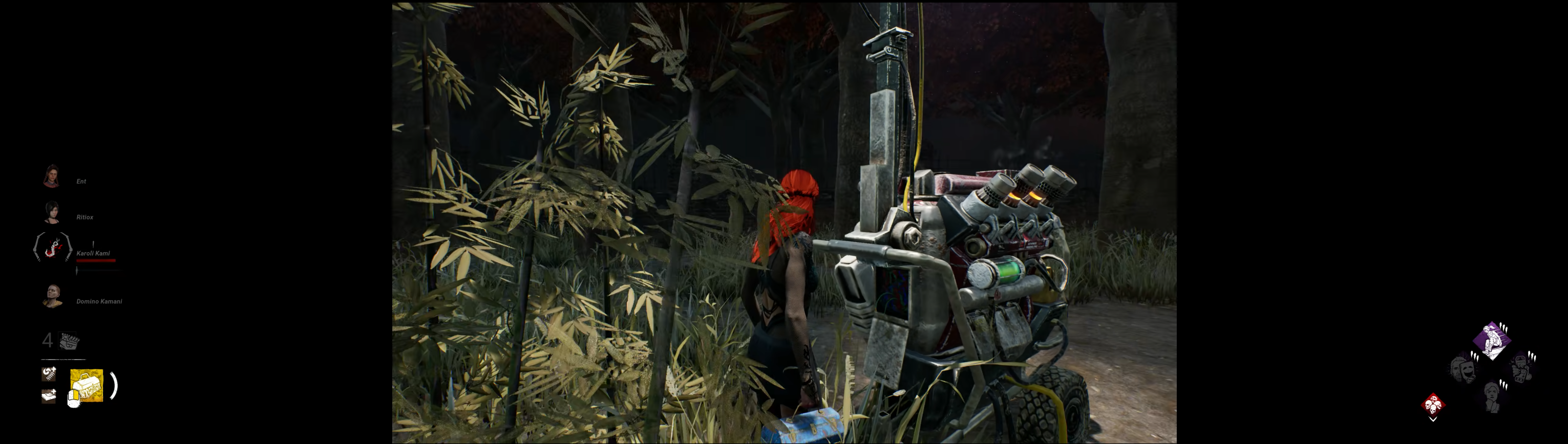
In this case, you can also see icons are shown outside of the 16:9 area.


Usernames, and by extension profiles, are hidden in the lobby because even though 16:9 is on, the lobby is still 32:9.

The endgame collapse timer's fog covers the most critical third of the screen. When looping in the endgame, you can’t peek over walls, for example. This gets even worse later in the collapse. Combined with the mending status or low gamma, it makes the game nearly unplayable.

Comments
-
One more thing, the latest patch, and change of the UI causes all hud elements to be outside of the 16:9 area, this is again going against the 16:9 mode. For example, I cannot record or stream my game now without massive black bars on either side.
To me, a user, all of the above would be solved by either,
- Fixing all the 16:9 mode issues.
- Or by adding/expansing a proper, expansive FoV slider that actually lets me use my monitor the way I bought it for, a 32:9 immersive experience.
1
