Once you have signed in, on the right hand side you can use the "report bug" button to be able to fully report the bug you've encountered. Thank you.
Outfit/Cosmetics not showing in customisation menu

SUMMARY OF THE ISSUE: Basically as seen in the example image below, I am unable to change my cosmetics for my characters as they do not show up. You can see I own outfits as I have some equipped on most characters. It's affecting outfits I have paid for with iridescent and auric cells, meaning I can't access content I have paid real money for. Unsure if this is an issue just for my account or widespread as I checked with my friend and this is not happening for them.
PLATFORM: Xbox One
STEP BY STEP INSTRUCTIONS ON HOW THE ISSUE OCCURED: I just logged in one day and the options disappeared.

Comments
-
You have most likely somehow put a filter on. Press the button next to the search bar that looks like a tag. It opens a small window and only thing check marked there should be "Owned" that should make all your cosmetics visible again.
1 -
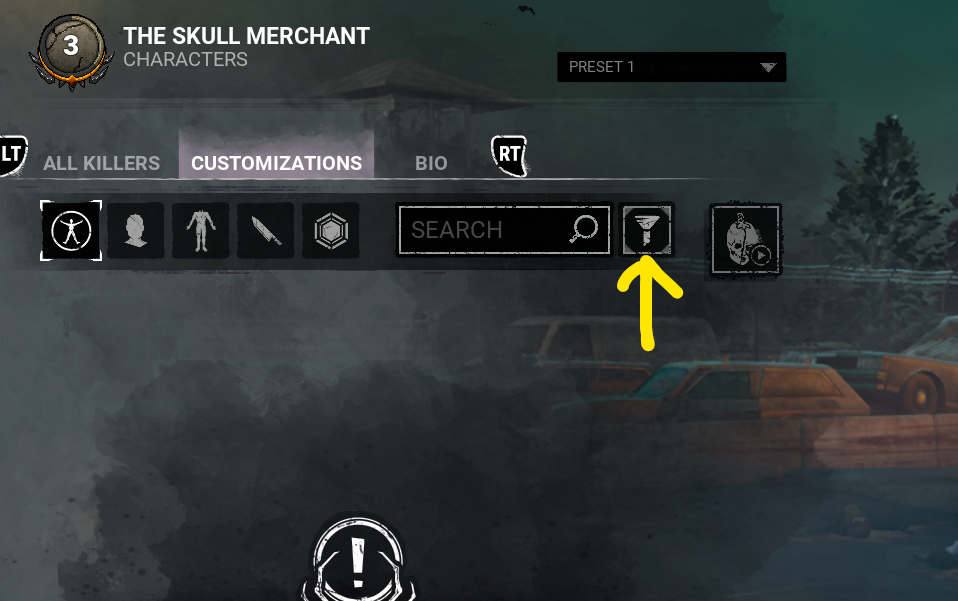
Can you check your filters first, please?
0 -
Thank you both so much, I am unsure on how this has happened as I don't use the cosmetics filter. But this is a life saver, thank you both 🙏 🙏 🙏
0