Once you have signed in, on the right hand side you can use the "report bug" button to be able to fully report the bug you've encountered. Thank you.
All Characters Missing Cosmetics

SUMMARY OF THE ISSUE: Customizations tab shows no cosmetics, even though I own some.
PLATFORM:
STEP BY STEP INSTRUCTIONS ON HOW THE ISSUE OCCURED: When visiting the customizations tab, it shows that I have no cosmetics. By navigating to the store, I am able to click on the cosmetic and apply it from there.
Resetting to the main menu and re-entering did not fix it. Restarting the game also did not fix it. This occurs both in the standard lobby and the 9-Year Anniversary Event lobby.
I bought some cosmetics during the session, namely Anniversary Masks and the Glitchtrap skin. I did not open the cosmetics tab before the purchase today, so I can't say when the issue began occurring.
The log after restarting the game:
Comments
-
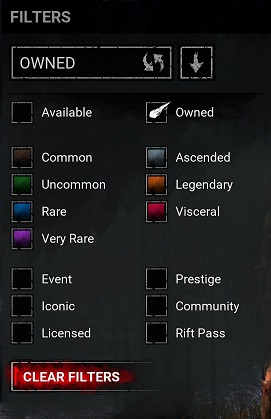
You most likely have filters on. In the Customizations tab press the button next to the search bar that looks like a tag. The window that appears only thing marked should be owned.
0 -
Do you have any of the filters selected when checking your cosmetics?
 0
0